SugarHalo Mini

SugarHalo Mini

1 SugarHalo Mini
$84.99
Regular price  Sale price  $84.99
Skip to product information
Black SugarHalo Mini showing 100 mg/dL with a Made in USA badge in the bottom-right corner

SugarHalo Mini

Your glucose. Already in view.
See your number without reaching for your phone.

Glucose at a glance

Easy desk or bedside checks

Optional alarms you control

Choose your option
Check My Setup Compatible cloud sharing is required

A small Wi-Fi display for compatible Dexcom, FreeStyle Libre, and Nightscout setups. No new sensor required. SugarHalo supplements your existing CGM; it does not replace it.

  • Dexcom G6 or G7 through Dexcom Share. Your smartphone app must share to the cloud, with Share enabled and a follower added. Use the login for the Dexcom account publishing the readings. A follower-only Dexcom Follow login will not work.
  • FreeStyle Libre through LibreLinkUp. You need a compatible smartphone setup and a LibreLinkUp follower account already showing the person whose reading you want displayed. Confirm your exact sensor, app, and regional setup.
  • Nightscout connects to your existing site using its address and appropriate access credentials. You do not need Nightscout for a supported Dexcom Share or LibreLinkUp connection.

Dexcom receiver-only and Libre reader-only setups cannot connect. Not sure? Send your CGM model and the app you use to support@sugarhalo.com before ordering. Check compatibility details

10-day returns
Free shipping
Dexcom
Nightscout
Libre
Deliver to your area Estimated:
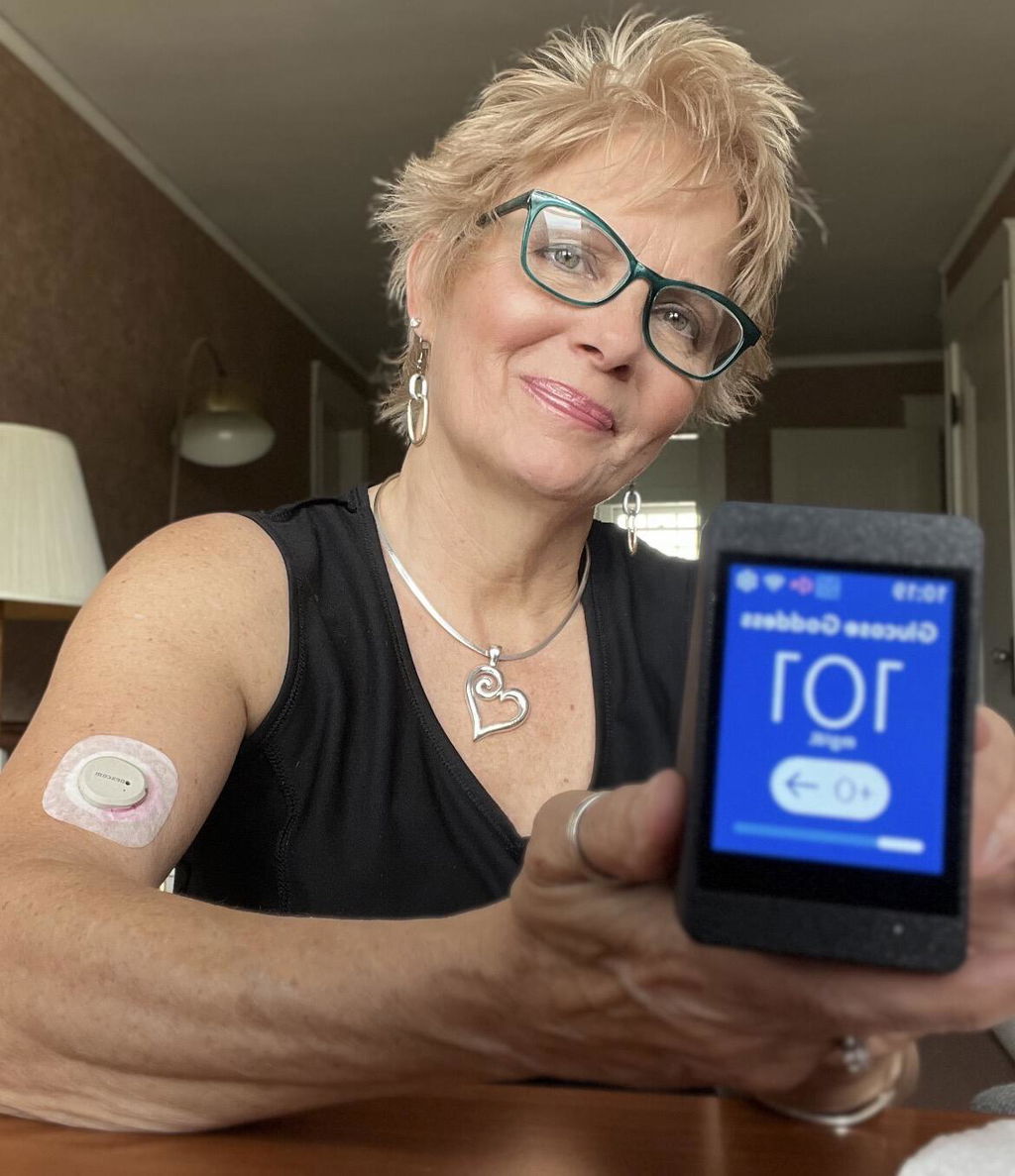
SugarHalo customer Laura holding her SugarHalo Mini display
“I keep it on my desk at work and can check my glucose at a glance without unlocking my phone.”

Laura L., SugarHalo customer review

Read customer reviews

Sometimes, you just want your number.

Your phone is beside you, screen down. You want to see your glucose without checking your messages, scrolling through notifications, or opening your inbox.

SugarHalo Mini gives your existing CGM reading a dedicated place on your desk, nightstand, or kitchen counter, so checking the display can be as simple as looking over.

Where would a quick glance be useful to you?

Beside your keyboard.

You are working, studying, or getting something done. Put SugarHalo beside your screen so your glucose has its own viewing spot, without another reason to pick up your phone.
Your number in view
No new sensor
Your phone stays yours
1
SugarHalo Mini displaying glucose beside a keyboard and monitor on a desk

Beside your bed.

When you are awake and want to see your glucose, look toward the display on your nightstand. Another place to view your reading without reaching for your phone.
Nightstand-friendly
Adjustable brightness
Optional sound
2
SugarHalo Mini with a blue glucose screen on a nightstand beside a lamp

On your kitchen counter.

Morning coffee. Making lunch. Getting dinner ready. Give your glucose a place in the space where those everyday routines happen. Start with the place where you would most appreciate having the number in view.
Fits your routine
A dedicated display
Plug-in power
3
SugarHalo Mini with a purple glucose screen on a kitchen counter beside a coffee mug

A dedicated display. With room to make it yours.

Your number, front and center.

A compact 2.8-inch screen gives your glucose information a dedicated display without taking over your desk or nightstand.

Black SugarHalo Mini displaying 100 mg/dL on a pale blue background

Keep your phone. Give your glucose its own screen.

Your CGM provides the reading. SugarHalo gives it a place in the room.

SugarHalo
SugarHalo
Phone
Phone

Always visible live glucose readings

✓ ×

Readable from across the room

✓ ×

Custom themes to make it yours

✓ ×

Loved ones can easily see glucose readings

✓ ×

Custom alert sounds

✓ ×

Your phone still has its job. SugarHalo has a different one: displaying your shared glucose information in a place you choose. Not more glucose data. Not another sensor. A more convenient viewing arrangement for information your compatible setup already provides.

Your glucose, shared with the people you choose.

Shared visibility should be something you choose together. Set it up with the permission of the person whose glucose is displayed.

For parents doing 3am checks

Keep glucose visible on the nightstand so you can glance at the number without unlocking a phone in the middle of the night.

For loved ones who worry

Give family a calm shared place to check in, without asking for your phone or interrupting the person managing diabetes.

For college bedrooms

A visible display gives parents and roommates an easier way to view the latest glucose reading without opening a phone.

For sleeping through alerts

SugarHalo keeps the latest glucose reading visible without requiring another phone check.

For partners and caregivers

Place it where both people can see it, so support feels less like constant asking and more like quiet awareness.

For phone-check fatigue

Check the number without opening the app drawer, getting pulled into messages, or losing twenty minutes to your phone.

For kitchen counters

Set SugarHalo near the kitchen so the latest reading is easy to view during everyday routines.

For calmer nights

A dedicated display gives the room one clear place to look, helping nighttime check-ins feel less disruptive.

Start with the setup you already use.

SugarHalo shows glucose data shared through your compatible setup. It connects over Wi-Fi rather than communicating directly with your sensor.

  1. Connect power and Wi-Fi.

    Plug in the included USB cable and follow the setup instructions to join your supported 2.4 GHz home Wi-Fi.

  2. Choose your glucose source.

    Select Dexcom, LibreLinkUp, or Nightscout, then enter the account details required for that connection.

  3. Choose your place and preferences.

    Once connected, position your display and adjust its available settings.

Setup uses a browser-based portal; your existing CGM or sharing app is still required where applicable.

View the Setup Guide

Will SugarHalo work with my CGM?

Answer a few quick questions to find the right connection for your setup.

Dexcom G6 or G7

Connect through Dexcom Share.

Your Dexcom smartphone app must be sharing readings to the cloud, with Share enabled and a follower added. Have the login for the Dexcom account publishing those readings ready. A follower-only Dexcom Follow login will not work.

FreeStyle Libre

Connect through LibreLinkUp.

You need a compatible Libre smartphone setup and a LibreLinkUp follower account that already shows the person whose reading you want displayed.

Confirm your exact sensor, app, and regional setup before ordering; the Libre brand name alone does not establish compatibility.

Nightscout

Connect to your existing Nightscout site.

Have your site address and the appropriate access credentials ready.

Nightscout is a separate connection option. You do not need to set up Nightscout to use a supported Dexcom Share or LibreLinkUp connection.

Only using a Dexcom receiver or Libre reader?

SugarHalo cannot connect to receiver-only or reader-only arrangements. Your readings need to be available through a supported cloud-sharing setup.

For every connection

SugarHalo needs supported 2.4 GHz Wi-Fi, an internet connection, and access to your selected glucose-sharing service. It does not connect directly to your sensor.

Not sure which setup you have?

Send your CGM model and the app you use to support@sugarhalo.com before ordering.

Ask About My Setup
Sam, Founder of SugarHalo

Type 1 is part of my life too.

Sam, Founder of SugarHalo

I’m Sam, the founder of SugarHalo. I’ve lived with Type 1 diabetes since I was 13.

My family has lived alongside it, through the late-night checks and the concern that does not simply disappear when your child grows up.

I created SugarHalo because I wanted my glucose easier to see without repeatedly picking up my phone. I wanted my family to have a way to glance at it, too.

That is the idea behind SugarHalo Mini: take a reading that already exists and give it a useful place in everyday life.

Shop SugarHalo

Frequently Asked Questions

Why buy a display when I already have my phone?

Because access and placement are different things. SugarHalo is for someone who wants an existing glucose reading visible in a particular place without using their phone to view it there. It is not about getting different glucose information. It is about giving that information a dedicated screen.

Do I still need my existing CGM app?

Yes. SugarHalo does not replace the setup that measures and shares your glucose. Continue using the apps and accounts required by your selected connection. SugarHalo displays the information that supported setup makes available.

What comes in the box? Does it need to stay plugged in?

The box contains your SugarHalo Mini and a USB-C-to-USB-A power cable. Plan to keep the display connected to a USB-A power source. It is a plug-in display.

What happens if my internet or glucose-sharing service goes down?

SugarHalo depends on your internet connection and the selected data service. Interruptions or third-party changes can delay readings or make them unavailable. It cannot provide an independent data connection when the required service is unavailable. Continue relying on your primary medical devices.

Can SugarHalo replace my CGM alarms or guide treatment decisions?

No. SugarHalo is an informational companion display, not an FDA-cleared medical device. Use your approved glucose-monitoring devices and healthcare team for treatment decisions, including dosing and responding to high or low glucose. SugarHalo does not replace official CGM alerts or guarantee that it will wake you.

Where do you ship, and when will my order arrive?

Shipping is currently available within the United States. Your estimated delivery date appears at checkout, and tracking information is emailed after your order ships.

What is the return policy?

U.S. customers may request a return within 10 days of delivery. Returns require approval, and the item must be in its original condition with its original packaging. Customers pay return shipping. If your device arrives damaged or defective, contact us for a replacement. Connectivity issues caused by third-party system changes are excluded under the return policy. Please review the full terms before ordering. Read the Return Policy.

Will SugarHalo work with my CGM?

Start with how you share your readings, not just the name on your sensor. Dexcom G6 or G7 connects through Dexcom Share with Share enabled and a follower added; use the login for the Dexcom account publishing those readings. FreeStyle Libre connects through a LibreLinkUp follower account that already shows the person whose reading you want displayed. Confirm your exact sensor, app, and regional setup. Nightscout connects to your existing site using its address and access credentials. Receiver-only and reader-only arrangements cannot connect. Not sure? Send your CGM model and the app you use to support@sugarhalo.com before ordering.

Is there a SugarHalo monthly fee?

Buy the display once. There is no ongoing SugarHalo subscription to use it. Your existing CGM and any separately required services remain separate.

Can I keep the display quiet and dim it at night?

Yes. Use SugarHalo’s optional high and low alerts when they fit your preferences, or mute its sound and use it as a display. Adjust daytime brightness and schedule a dimmer nighttime screen. Continue relying on your primary CGM or medical device for its official alerts. SugarHalo is not a replacement alarm system.

  • 5 stars: 16 (100%)
  • 4 stars: 0 (0%)
  • 3 stars: 0 (0%)
  • 2 stars: 0 (0%)
  • 1 star: 0 (0%)
L
Laura Lastoria
Glucose Goddess®️ Approved!

I honestly love my Sugar Halo. As someone who’s lived with Type 1 diabetes for 28 years, it’s refreshing to use something designed by a fellow T1D who truly gets our daily lives.

My favorite feature is the Always-On Display—I keep it on my desk at work and can check my glucose at a glance without unlocking my phone.

I also love the custom alarms, which let me set reminders that fit my routine. It’s a thoughtful product that makes managing Type 1 diabetes easier and less stressful.

Thank you, Sam, for creating something so meaningful for our T1D community.💙

T
Tiffany
Highly Recommend for School and Home!

We bought one for our daughter’s teacher to use in the classroom. We tested it out at home for a few days before giving it to her and loved it so much that we ended up buying another one for ourselves! It’s so nice being able to see her blood sugar at a glance without constantly having to check our phones.

Her teacher was so excited to have it in the classroom so she can easily see her numbers throughout the day without constantly checking her phone. It also gives her some peace of mind being able to see where her blood sugar is at instead of being caught off guard and panicking when her phone alarm goes off for a low.

One tip if you’re having trouble connecting your Dexcom account: Go into the Account tab in the Dexcom app and double-check the username listed there. I was mistakenly using my phone number because that’s what I use to log into Dexcom online, and I couldn't get it to connect. Once I realized I was using the wrong username, I was able to log in right away and her blood sugar data showed up instantly!

Another thing we love is that we can still see her blood sugar while she’s at school or away from home. She doesn’t have to be anywhere near the device for her readings to show up since it connects through her Dexcom account rather than the Follow app.

Overall, we love it and would definitely recommend it!

J
James Cheairs
It works great

It works great. Simple setup and has a small enough footprint to not be distracting to others in my living room.

A
Anonymous
It’s awesome! Easy to set up

It’s awesome! Easy to set up, easy to read.
Syncs right up when I get home! Would definitely recommend 👍🏻

M
MB
Works great

Bought it for my living room and works great.

M
Melissa Kelly
This device is a game changer for my life

This device has been a complete game changer for my life. I don’t have a pancreas anymore and so no glucagon. Night time lows are incredibly dangerous for me. I no longer need to open my phone multiple times a night to check for danger.

A
Anonymous
Great Little Display

This device does exactly what they advertise it to. It helps me not to have to constantly check my phone or reader for my blood sugar readings.

T
Therronbrown
Fantastic Device and Support.

This unit looks incredible! I own other display devices. This device has the best of the other devices combined in one unit. Customer service is outstanding. Reasonably priced.
The company has done an outstanding job. I highly recommend the Sugar Halo!
Thanks Sam!

A
Anonymous
Love the device

Love the device. Only callout is dimensions could not be found when ordering (may have missing but if it's not included on the site please add for others). It's smaller then expected based on images next to things/hands but still love how it work. There were also no instructions...it's very intuitive once you turn it on but even a sticker giving any indication to "turn on and follow the steps" would be nice.

P
Pat Murray
Great product.

I've been looking for something like this for a while. Fair price and great customer service. I bought a second one for a different room. Very useful.

J
JON WEDDLE
You need one of these!

I like everything about this awesome little device.

L
Leo
Is there a sugar halo app i can download instead

Is there a sugar halo app i can download instead of a website?

Hi Leo! SugarHalo does not currently have a downloadable app. Settings are managed through the web portal built into the device. Tap the down arrow at the top of the SugarHalo screen, select Open Portal, and scan the QR code with your phone. We may explore a dedicated app in the future. Thank you for the five-star review!

A
Anonymous
We love these for our family! Very convinient and you can quickly track levels and trends

We love these for our family! Very convinient and you can quickly track levels and trends. Thank you and a must have for a Type1 family.

S
Stephanie Nettles
Love this product

Exactly what I was looking for! It updates quickly (unlike my Fitbit), and I appreciate that the alarms are optional. My Dexcom app has the alarms covered for me, but I wanted something that would make my readings more visible. It's easy to set up and easy to move around the house -- it takes just a few seconds to start up after plugging back in. My only "complaint" is that I'd prefer it to be battery-powered and rechargeable - but that's a small thing, and none of the other glucose display monitors I've seen are battery powered. Anyway, I don't know how I lived this long without it!

D
Denise Vargas
Love the sugarhelo mini

Love the sugarhelo mini. Easy to setup and view your numbers. Alerts are nice, thank you !

E
Elan Beaton
Great new tech!

Great new device to add. Needed something with different alarms since I was getting too use to my other ones.

Black SugarHalo Mini displaying 100 mg/dL on a pale blue background

Give your glucose a place of its own.

The next time you want your number, where would you rather look? Give your existing CGM reading a dedicated place on your desk, nightstand, or counter.

  • Free U.S. shipping
  • No SugarHalo monthly subscription
  • No new sensor required
  • Compatible cloud sharing is required
Buy Now